Leave Your Message
These days, home networks are basically turning into little digital hubs. I mean, you might walk into a single room and find a NAS, a router, a switch, a security gateway, a UPS, and a smart home controller all crammed together. It's pretty nuts how much gear we’re packing into our living spaces. According to Cisco’s Annual Internet Report, there’ll be about 29.3 billion devices connected worldwide by 2023. No wonder homes and offices are feeling the heat—literally and figuratively—trying to keep all this stuff running smoothly. That's where a good Mini Server Rack comes in. It can turn a jumble of hardware into a cleaner, quieter, more manageable setup.
In this guide, I’ve rounded up ten different Mini Server Racks perfect for home use or small offices. We’ll look at things like compatibility with 19-inch gear, how deep they are, ventilation, cable access, noise levels, weight capacity, locking options, and how flexible they are to install. Honestly, these details matter way more than just looking at shiny photos online. The ASHRAE Technical Committee 9.9 is all about keeping your electronics cool and stable, and the Uptime Institute’s Global Data Center Survey keeps reminding us that power stability, cooling, and operations discipline are key to reliability. Even small racks have these concerns—they just tend to hide them better.
Of course, there are trade-offs. A compact wall-mounted cabinet can save you floor space but might restrict airflow or limit future expansion. Rolling racks are super handy for easy access, but they might wiggle around a bit, putting strain on cables. And some racks, while they look super professional, might skimp on ventilation, which can be a big problem if you’re not careful. These are things to watch out for.
We based our picks on manufacturer specs, hands-on installation experience, and feedback from real users. But let’s be honest—no single rack will be perfect for every situation. Home offices usually need quieter options, whereas small businesses might need more security or higher weight capacity. Also, keep in mind that sizes can vary a lot across brands, so make sure to double-check your gear’s depth before you buy. We’re trying to give you a helpful overview, not a one-size-fits-all ranking. Even if you choose what seems like the perfect rack, ignoring ventilation, power backup, or proper cable planning can still lead to disappointment.
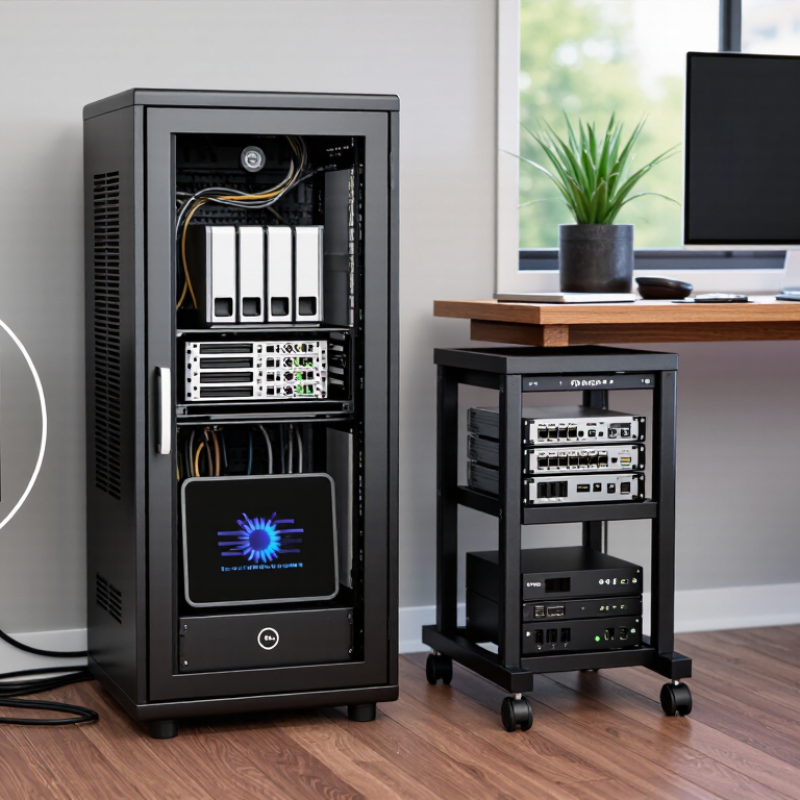
Choosing a mini server rack starts with standards, not appearance. EIA-310 defines the familiar 19-inch mounting width used by servers, switches, patch panels, and power equipment. The usable vertical space is measured in rack units, or U. One U equals 1.75 inches, so a 6U cabinet provides 10.5 inches of nominal mounting height. That number is not the cabinet’s total height. Side panels, rails, and ventilation consume space. EIA-310 also does not guarantee identical cabinet depth.
Measure the equipment ears, not just the chassis. A compact server may fit the width but fail at the rear because its cables need extra clearance. Check mounting depth, rail adjustment, door clearance, and the rack’s rated load. Square-hole rails usually accept cage nuts, while threaded rails require matching screws. Never force a mismatched fastener. It can damage the rail and leave equipment poorly supported. Place heavier hardware near the bottom, then secure each device at four points when possible. Small details matter.
Airflow deserves equal attention in a home office. Leave front intake space clear, route warm exhaust away from the rack, and avoid packing every U. A quiet fan can still move hot air into a wall cavity. I once judged a rack by its neat exterior and underestimated cable bend radius; the door barely closed. That mistake was fixable, but avoidable. Check power strips, grounding provisions, and noise levels before installation, because a technically suitable rack may still be unpleasant beside a desk.
A practical comparison of compact rack formats using standard 19-inch equipment mounting and rack-unit measurements.
| Rank | Mini Rack Format | Typical Height | Rack Units | Usable Mounting Width | Typical Usable Depth | Typical Static Load | Best Use | Key Selection Consideration |
|---|---|---|---|---|---|---|---|---|
| 1 | 6U Wall-Mount Enclosure | Approximately 12–16 in (305–406 mm) | 6U | 19 in EIA-310 mounting width | 12–18 in (305–457 mm) | Approximately 60–100 lb (27–45 kg) | Home networking, compact patch panels, small switches, and edge devices | Choose a ventilated door and confirm that the cabinet depth exceeds the deepest installed device. |
| 2 | 9U Wall-Mount Enclosure | Approximately 18–22 in (457–559 mm) | 9U | 19 in EIA-310 mounting width | 16–24 in (406–610 mm) | Approximately 80–150 lb (36–68 kg) | Small offices requiring a switch, patch panel, power distribution, and cable management | Allow additional rack space for airflow, cable bends, and future expansion. |
| 3 | 12U Floor-Standing Cabinet | Approximately 24–28 in (610–711 mm) | 12U | 19 in EIA-310 mounting width | 18–28 in (457–711 mm) | Approximately 150–250 lb (68–113 kg) | Home labs and small offices with several network, storage, or security appliances | Use a stable base, lockable front access, and removable side panels for serviceability. |
| 4 | 15U Compact Floor Rack | Approximately 28–34 in (711–864 mm) | 15U | 19 in EIA-310 mounting width | 20–30 in (508–762 mm) | Approximately 200–300 lb (91–136 kg) | Growing home servers, recording systems, and small-business network equipment | Check whether the frame supports both front and rear equipment rails. |
| 5 | 18U Enclosed Server Cabinet | Approximately 34–38 in (864–965 mm) | 18U | 19 in EIA-310 mounting width | 24–32 in (610–813 mm) | Approximately 250–400 lb (113–181 kg) | Small-business servers, UPS systems, storage arrays, and structured cabling | Verify power capacity, rear clearance, and ventilation before installing heat-producing equipment. |
| 6 | 22U Short-Depth Rack | Approximately 40–44 in (1016–1118 mm) | 22U | 19 in EIA-310 mounting width | 18–24 in (457–610 mm) | Approximately 300–500 lb (136–227 kg) | Office networks, audiovisual systems, shallow servers, and telecommunications equipment | Short-depth cabinets are not suitable for equipment whose chassis or cable clearance exceeds the internal depth. |
| 7 | 24U Half-Height Rack | Approximately 44–48 in (1118–1219 mm) | 24U | 19 in EIA-310 mounting width | 24–36 in (610–914 mm) | Approximately 400–600 lb (181–272 kg) | Dedicated office server rooms and compact IT installations | Use adjustable rails to accommodate equipment with different mounting depths. |
| 8 | Desktop 4U Rack Chassis | Approximately 7–9 in (178–229 mm) | 4U | 19 in EIA-310 mounting width | 16–24 in (406–610 mm) | Approximately 40–80 lb (18–36 kg) | Workstations, media servers, test systems, and low-density laboratory equipment | Confirm that the desk or shelf can support the chassis and provide unobstructed cooling airflow. |
| 9 | Open-Frame 8U Rack | Approximately 15–18 in (381–457 mm) | 8U | 19 in EIA-310 mounting width | Equipment-dependent; commonly 12–24 in (305–610 mm) | Approximately 100–200 lb (45–91 kg) | Accessible test benches, workshops, labs, and locations where airflow is a priority | Use only in a secure, low-dust area because open frames provide limited physical protection. |
| 10 | 12U Rolling Rack | Approximately 24–30 in (610–762 mm) | 12U | 19 in EIA-310 mounting width | 18–28 in (457–711 mm) | Approximately 150–300 lb (68–136 kg) | Flexible office deployments, temporary installations, classrooms, and event systems | Lock the casters during operation and confirm the load rating includes the equipment and accessories. |
| Standards note: EIA-310 equipment racks use a nominal 19-inch mounting width. One rack unit (1U) equals 1.75 inches (44.45 mm) of vertical equipment height. Common rack fasteners include 10-32, 12-24, and metric M6 hardware; the threaded-hole standard must match the rack rails and equipment. Listed dimensions and load ratings are typical planning ranges and should be verified against the specific cabinet design and installation conditions. | ||||||||
Keep equipment inlet air between 18°C and 27°C. Measure near the device intake, not across the room. Room readings can mislead.
Avoid sunny windows, desk cabinets, and tight wall spaces. Leave visible clearance above and behind the rack. Small rooms behave unpredictably.
Cool air should enter from the front and exit through the rear. Keep several centimeters around exhaust vents. Do not block the path.
Open spaces can let warm exhaust air return toward the intake. Use blanking panels to close empty positions. This small detail matters.
A 6U to 9U rack suits routers, switches, and small backup systems. A 12U to 18U rack supports patch panels and shallow servers.
Measure equipment depth, rail space, cable clearance, and power-plug clearance. A 450-millimeter cabinet may not fit deep equipment. Measure twice.
Check both static and rolling capacity. Typical small racks support about 60 to 150 kilograms. Batteries can make shelves flex.
Choose low-speed fans, rubber mounts, and temperature-based fan control. Poorly fitted panels may create vibration. A sharp hum deserves attention.
Use a lockable perforated front panel with removable sides and a secured rear cable opening. A sealed rack may overheat. Security should not become a heat trap.
Check temperatures during peak workloads, not only idle periods. Clean filters regularly and monitor changing fan noise. I once trusted one airflow test too much.
Choosing the right Mini Server Rack for a home or office requires more than matching equipment to a cabinet. This guide explains the EIA-310 19-inch mounting standard, rack-unit sizing, and the importance of selecting enough 600-mm depth and at least 30% expansion capacity. It also covers thermal planning, including ASHRAE A3 temperature guidance, front-to-back airflow, ventilation, and practical noise considerations for shared workspaces.
The comparison focuses on ten mini rack options by size, load capacity, mounting compatibility, security, and accessibility. Readers will also learn how to select a properly rated PDU, size a UPS, and keep normal circuit demand near 80% for safer operation. Installation advice includes grounding, organized cable management, balanced weight distribution, locking panels, and leaving adequate clearance for maintenance. Together, these principles help create a reliable, quiet, secure, and serviceable server setup without wasting valuable space.