Leave Your Message
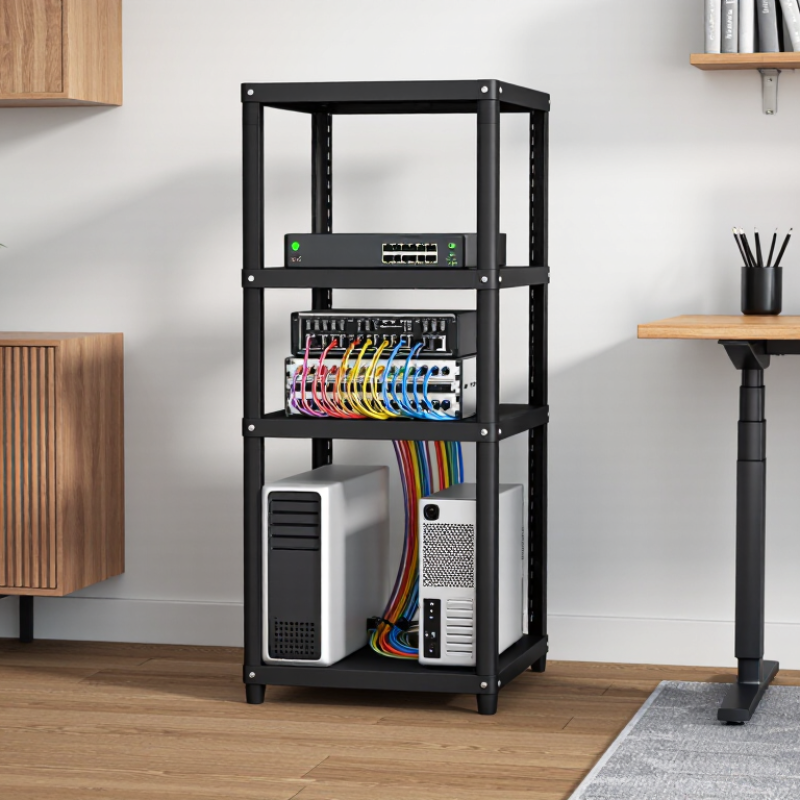
Choosing a home server rack isn’t just something for big data centers anymore. More and more, home users are using these compact setups to store media, backups, security footage, and run smart-home gadgets. It’s pretty cool how a good rack can transform a cluttered desk into a tidy, organized tech space. Think labeled cables, a quiet switch humming subtly in the background, and a server safely tucked away to avoid spills. But hey, don’t let the looks alone guide your choice—factors like depth, airflow, weight capacity, power access, and noise levels are actually more important.
Remember John Gage’s famous line? “The network is the computer.” Still holds true today, especially when you think about your home setup. A rack isn’t just some piece of furniture; it’s the backbone keeping all your connected devices running smoothly.
In this guide, I’ll walk you through some practical options from brands like APC, Tripp Lite, StarTech.com, Dell, Synology, and Ubiquiti. We’re talking wall-mounted cabinets, open-frame racks, enclosed floor models, and even compact mobile units—each suited for different rooms and needs.
Don’t forget to pay attention to measurements. A 12U rack might be perfect for your router, patch panel, UPS, and a little server, but it probably won’t fit the bigger enterprise gear. Got more space? A 24U cabinet gives you room to grow, but hey, it can take up quite a bit of room in a study or bedroom.
And let’s not overlook noise—it’s often underestimated. I’ve seen quiet systems become pretty distracting once an older server or extra components are added. Cooling’s another tricky bit—more airflow usually means fans working harder, which can bump up the noise.
The right choice really depends on what gear you have, how much space you’ve got, your budget, and whether you’re planning to expand down the line. Not every home needs a huge cabinet—sometimes, it’s better to get your cables under control first. That part’s a bit uncomfortable, I won’t lie—poor planning can’t be fixed just with a rack. So, think ahead and choose wisely.
Top Home Server Rack Options for Home Networking
A home server rack organizes networking equipment, servers, storage, and power hardware in one controlled space. Its main structure uses standard rack units, called U measurements. One U equals 1.75 inches of vertical height. A compact wall-mounted rack suits a router, patch panel, and small switch. A floor rack offers better expansion for servers, backup storage, and larger power equipment.
Depth matters more than many buyers expect. Short cabinets may not support full-depth servers or bulky power cables. Check equipment dimensions before choosing the enclosure. Ventilation is essential because heat collects around tightly packed devices. Perforated doors, side vents, and a clear airflow path help maintain stable temperatures. Still, airflow plans are often imperfect. A quiet room can become surprisingly warm.
Essential components include mounting rails, shelves, cable managers, and a power distribution unit. A battery backup protects equipment from brief outages and allows orderly shutdowns. Patch panels keep wall cables separate from active devices, making troubleshooting faster. Grounding hardware adds protection when installed correctly. Leave unused rack space for airflow and future upgrades. I have seen neat installations fail because cables blocked rear fans or exceeded a shelf’s weight rating. Label both cable ends. It saves time later. A temperature sensor can also reveal heat problems before performance becomes unreliable.
Home Server Racks: Purpose, Structure, and Essential Components
| Rack Option | Typical Height | Usable Depth | Approximate Equipment Capacity | Best Home Networking Use | Airflow and Cooling | Essential Components | Main Advantages | Important Considerations |
|---|---|---|---|---|---|---|---|---|
| Wall-Mount Enclosure | 6–15U | 300–600 mm | Network switch, router, patch panel, firewall, and small UPS | Small offices, apartments, structured home cabling, and compact network closets | Passive ventilation or small fan modules; leave clearance around the enclosure | Rack shelf, patch panel, cable manager, power strip, and ventilation panel | Space-saving, keeps cables organized, and can be installed above floor level | Limited depth and weight capacity; verify wall strength before installation |
| Open-Frame Floor Rack | 12–25U | 450–800 mm | Network equipment, compact servers, storage devices, and UPS units | Home labs, test environments, and networking setups that require frequent access | Excellent natural airflow; optional fans can be added to manage heat | Rack rails, shelves, cable rings, vertical power distribution, and grounding accessories | Easy access, flexible installation, and generally lower cost than enclosed cabinets | Does not protect equipment from dust, accidental contact, or household noise |
| Compact Enclosed Cabinet | 9–18U | 450–600 mm | Router, switches, patch panels, compact servers, and shallow storage equipment | Living spaces, media rooms, and homes that need a cleaner and quieter installation | Ventilated doors and side panels; active fans may be required for dense equipment | Adjustable rails, locking doors, shelves, cable managers, and temperature monitoring | Improves physical protection, appearance, and cable security | Heat can build up if airflow is blocked; confirm equipment depth and rear cable clearance |
| Full-Height Server Cabinet | 24–42U | 600–1,000 mm | Multiple servers, storage arrays, switches, patch panels, and larger UPS systems | Advanced home labs, virtualization, media servers, and multi-device storage systems | Front-to-back airflow with perforated doors; dedicated room ventilation is recommended | Server rails, blanking panels, cable management, power distribution, UPS, and grounding | High expansion capacity, strong equipment protection, and structured airflow | Requires substantial floor space, produces more heat and noise, and may need a dedicated circuit |
| Desktop Mini-Rack | 4–8U | 250–450 mm | Small switch, router, patch panel, mini computer, and compact backup device | Basic home networking, smart-home hubs, and small network-attached storage systems | Usually passive ventilation; avoid enclosed placement inside unventilated furniture | Short rack shelf, cable organizer, compact power strip, and ventilation panel | Simple to deploy, portable, and suitable for low-power equipment | Limited space, shallow mounting depth, and low thermal capacity |
| Hybrid Rack with Shelves | 12–24U | 450–800 mm | Rack-mounted devices plus non-rack equipment such as modems, hubs, and small computers | Mixed home labs where some equipment lacks standard rack mounting holes | Depends on cabinet design; maintain open space around shelf-mounted devices | Adjustable shelves, rack rails, cable management, power distribution, and cooling fans | Supports a wider range of equipment and simplifies gradual system upgrades | Shelves can reduce usable rack space and may restrict airflow if overloaded |
Planning guideline: reserve approximately 20–30% of rack capacity for future expansion, cable routing, ventilation, and maintenance access. Rack height is measured in rack units, where 1U equals 44.45 mm.
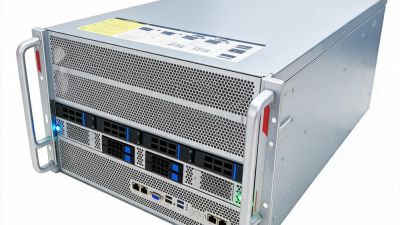
A 7U Gen4 AI rack barebone server provides a high-density foundation for ChatGPT-scale training and other large language model workloads. Designed to support fourth- and fifth-generation server processors, the platform delivers the computing capacity required for data preprocessing, distributed training, fine-tuning, and inference. It can be expanded with up to 4TB of DDR5 memory, allowing teams to handle larger datasets, complex models, and demanding multitasking requirements without frequent hardware reconfiguration.
Multiple GPU cards can be installed through abundant PCIe 5.0 expansion, creating a flexible architecture for parallel AI computing. A high-density hot-swap power supply helps maintain stable operation during extended, high-load workloads, while serviceable rack design simplifies maintenance and future upgrades. From motherboard customization and full quality inspection to fast global delivery, the platform can be configured for different data center environments and deployment schedules, offering a practical 7U foundation for scalable AI infrastructure.
A wall-mounted rack saves floor space for routers, switches, and small patch panels. Measure carefully. Loaded enclosures become heavy.
Choose one for servers, storage devices, battery backups, and ventilation equipment. It offers easier access. Expect more noise and floor usage.
Open frames simplify patching, inspection, and airflow management. They cost less. Dust and physical exposure remain trade-offs.
A 12U to 18U cabinet often fits compact networking equipment. Measure equipment depth, cable clearance, and door swing before purchasing.
Use perforated doors, spaced rails, and blanking panels around unused spaces. Place sensors near server air intakes. Check temperatures on warm afternoons.
Use a rack-mounted power distribution unit with overload protection and labeled outlets. Measure real power consumption. Estimates can mislead.
Route power and data cables separately when possible. Leave gentle service loops. Velcro straps allow easier changes than permanent ties.
Larger, slower fans usually sound less irritating than small fans at full speed. Rubber feet and closed panels can reduce rattling. Quiet is not always safe.
Use strong administrator passwords, multi-factor authentication, network segmentation, and updated firmware. Review login records regularly. Mistakes still happen.
Leave enough rear clearance for cables and future repairs. I once ignored this. The doors closed, but maintenance became awkward.
A Home Server Rack provides a structured, secure, and organized foundation for home networking equipment, storage systems, security devices, and network services. This guide explains the main rack components, including mounting rails, shelves, panels, power distribution, and cable pathways, while helping readers choose an appropriate size based on current equipment, available space, ventilation needs, and future expansion plans. It also compares wall-mounted, floor-standing, and open-frame designs to clarify which option best suits different room layouts and installation preferences.
The article further examines essential factors such as cooling, power management, cable organization, and noise control. It offers practical guidance for selecting rack equipment for storage, network access, monitoring, and data protection without focusing on any specific brand. Finally, it covers installation planning, routine maintenance, equipment accessibility, airflow management, and expansion strategies, helping homeowners create a reliable, efficient, and adaptable networking environment.